

What an IP Address Can and Cannot Reveal
What an IP Address Can and Cannot Reveal
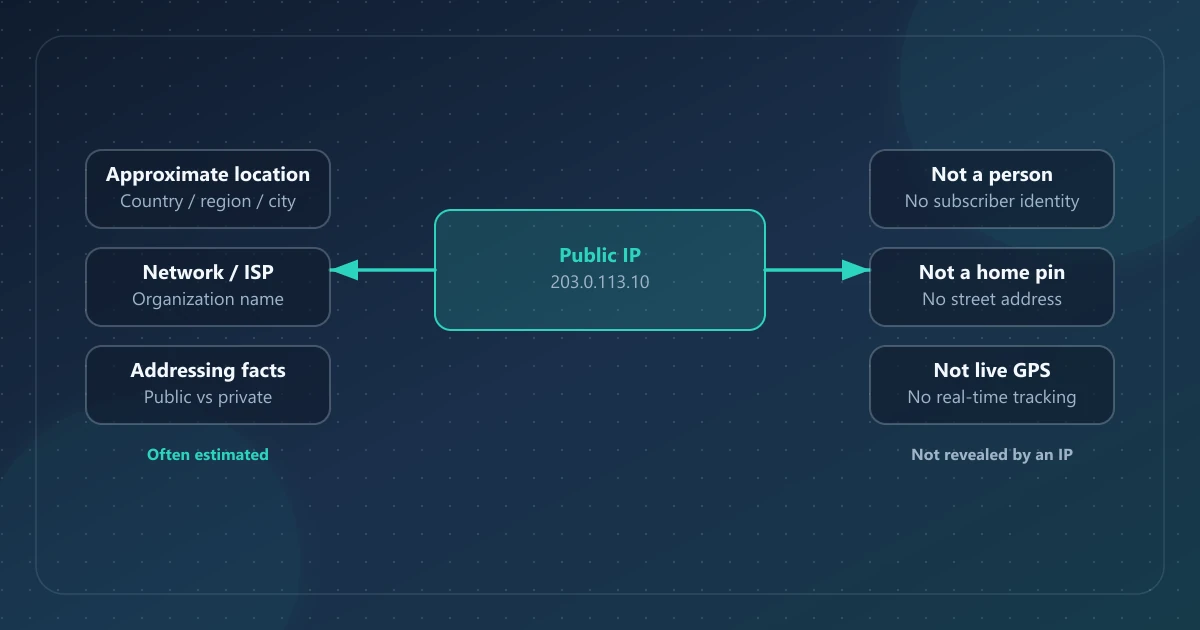
A public IP address is a routing label for a network connection. It is not a passport, a street address book entry, or a live GPS pin. Understanding that distinction helps you interpret lookup results calmly—and avoid both scare stories and false reassurance.
This article separates what an IP-derived lookup can reasonably show, what it cannot, and what other systems add when websites combine an IP with cookies, accounts, or browser signals.
Direct answer
From a public IP address, a lookup service can usually report the network associated with the address and an estimated geographic area. It cannot read a name, exact home address, passwords, files, camera, or browsing history from the address itself. Associating an address with a particular person requires records or other signals that a public lookup does not have.
What “reveal” means here
People use “reveal” loosely. Clarify the source of each claim:
| Source | Examples | Who produces it |
|---|---|---|
| Observed or IP-associated | Source IP seen by the service; ISP/org label; approximate country/region/city; sometimes ASN or estimated coordinates | The receiving service plus network/geolocation databases |
| Local browser / device signals | Browser name, OS, user agent, browser timezone | Your own browser (or the client making the request) |
| Service-side correlation | Account login, cookies, payment data, support tickets | Websites and apps you use |
| Provider assignment records | Which customer or downstream network used an address at a particular time, where such records exist | The provider operating that part of the network—not a public IP lookup |
IPinfoLabs shows IP-derived network fields and local browser/device fields in one dashboard. That convenience is useful—but the fields are not the same kind of evidence. Learn how to read them in How to Check Your Public IP Address.
What a public IP can indicate
1. The address others see for your connection
A website, API, or network edge can log the source address that reaches it. That may be your ISP-facing address, a shared CGNAT address translated further upstream, or the exit address of a VPN or proxy. Different services can therefore observe different addresses for the same user.
2. ISP or network organization
IP address space is distributed through the internet number registry system; the five Regional Internet Registries manage and register address space within their regions (ICANN ASO: RIRs). Lookup databases often return an ISP or organization label for an address. Treat that field as the data provider’s current association—not proof of legal ownership and never proof of who used the connection. What Is an ISP? explains why the label may not match the consumer brand on your bill.
3. Approximate location (IP geolocation)
IP geolocation databases associate address ranges with places using data sources and methods that vary by provider. Practical expectations:
- Country results are often more stable than city results, but neither is guaranteed.
- Region and city are estimates and can be stale or imprecise.
- Results may reflect an ISP point of presence, mobile gateway, or corporate exit—not your street.
- Coordinates, when shown, are database estimates, not a live GPS reading from your device.
Cloudflare’s own documentation notes that IP geolocation is not 100% accurate—a useful reminder that even large networks treat it as an estimate (Cloudflare: IP geolocation). For how those databases work and how to read country, region, and city fields, see What Is IP Geolocation?.
4. A network signal for service controls
Services may use an observed IP as one input for rate limits, fraud checks, or regional access rules. Those are operational uses of a network signal—not proof of a person’s identity.
What a public IP cannot reliably reveal
Exact street address or apartment
Public geolocation does not equal civic addressing. A city result can be far from the device, especially on mobile networks, rural connections, VPNs, or stale database entries.
Exact GPS coordinates of a person
Even when a database returns latitude/longitude, those values describe an estimated location for the IP block, not a tracked device. Do not treat them as a live pin on a map of a human.
Name, age, photo, or household member
An IP does not carry personal profile fields. Household NATs mean many people can share one public IPv4 address.
Passwords, messages, or files on a device
Knowing an IP is not the same as authenticating to a device. Encrypted HTTPS traffic is not “opened” by knowing the client IP. Claims that “having an IP lets someone hack your phone” confuse addressing with access.
Browsing history by itself
A public IP lookup cannot derive browsing history from the address. Websites and network providers may have their own separate logs, subject to their systems, policies, and applicable requirements; those records are not encoded in the IP address.
“Permanent identity”
Many consumer addresses are dynamic. Changing networks (or connecting a VPN) changes what the public internet sees. Persistence varies by ISP and product.
Provider records are separate from public lookup data
An ISP may be able to associate an address and timestamp with a subscriber, shared gateway, or downstream network using its assignment and connection records. Whether that identifies one device or person depends on the network design, address sharing, timestamps, ports, record retention, and other evidence. RFC 6269 explains why address sharing weakens the assumption that one public IPv4 address represents one subscriber.
Public lookup tools do not have those private provider records. They report network and geolocation metadata from their own data sources.
VPN and proxy: what changes—and what does not
A VPN usually routes selected traffic through an exit server, so sites on that path see the exit address. An application proxy changes only traffic configured to use it. Approximate location and ISP fields then describe the exit network, not necessarily the user’s physical location or access ISP.
What a VPN does not automatically erase:
- Login identity on websites where you are signed in
- Cookies and account-linked history
- Browser fingerprinting signals
- Payment or shipping addresses you provide
- Malware already on a device
Use a checker to confirm the visible public IP after connecting. Confirmation of IP change is a network check—not a guarantee of anonymity.
Browser and device fields: do not blame the IP
When a dashboard lists browser, OS, platform, timezone, or user agent next to an IP, ask: did this come from the IP database or from my browser?
On IPinfoLabs:
- Network + approximate location → derived for the looked-up public IP
- Browser/device/timezone/user agent → from your local session
So if you look up a remote public IP, do not interpret your Chrome version as “that host’s browser.”
Practical threat model (without fear marketing)
| Scenario | Realistic risk from IP alone | What usually matters more |
|---|---|---|
| Website you visit logs the source IP it sees | Normal network operation; retention and use vary | Account login, cookies, and service-side records |
| Someone in a chat sees your IP | May learn ISP + rough region | Do not overshare personal details; report harassment |
| You worry about an exact home address | Public geolocation alone does not supply one | Additional records or independent identifying information |
| You use a VPN | Changes visible IP/geo | Account identity and browser state remain |
Avoid articles that promise street-level stalking from a casual IP paste, or that claim an IP is harmless in every context. The honest middle is more useful.
How to interpret an IPinfoLabs-style result responsibly
- Read the public IP as the current network identity for that path.
- Treat country/region/city as approximate context.
- Use ISP/organization as the network association reported by the provider.
- Keep browser/device fields mentally separate.
- For up to 50 public addresses, Bulk Lookup can add ASN and estimated coordinates—still estimates.
- For architecture and privacy posture, see About and the Privacy Policy.
Related reading in this cluster
- How to Check Your Public IP Address — practical checking and field-by-field reading
- Public vs Private IP Addresses — why your laptop shows
192.168.x.xwhile websites show something else - IPv4 vs IPv6 — which protocol a checker may be showing
- What Is IP Geolocation? — why city and coordinates are estimates
- What Is an ISP? — how ISP and organization fields relate to your connection
FAQ
Can someone find my exact home address from my IP?
Not from a public IP geolocation lookup alone. Those tools estimate network location. Connecting an address to a service address requires additional provider records or independent identifying information that the public lookup does not contain.
Does my IP show my exact identity?
No. It identifies a network endpoint assignment, not a person. Identity correlation needs additional systems (accounts, ISP records, or other signals).
Why does my IP city look wrong?
Common causes include ISP routing through a distant PoP, mobile gateways, outdated or coarse database entries, corporate exits, and VPN/proxy egress cities.
Is sharing my IP always dangerous?
Context matters. Sharing with a support engineer can be normal. Pasting it into hostile public channels can invite harassment or probing—even though an IP is not a password. Prefer private support channels when issues are sensitive.
References
- IANA IPv4 Special-Purpose Address Registry
- ICANN Address Supporting Organization — Regional Internet Registries
- RFC 6269 — Issues with IP Address Sharing
- Cloudflare — IP geolocation
- IPinfoLabs FAQ — short answers on approximate location and VPN visibility