

Τι είναι ένας ISP; Κατανόηση του παρόχου υπηρεσιών διαδικτύου και των πληροφοριών IP
Τι είναι ένας ISP; Κατανόηση του παρόχου υπηρεσιών διαδικτύου και των πληροφοριών IP
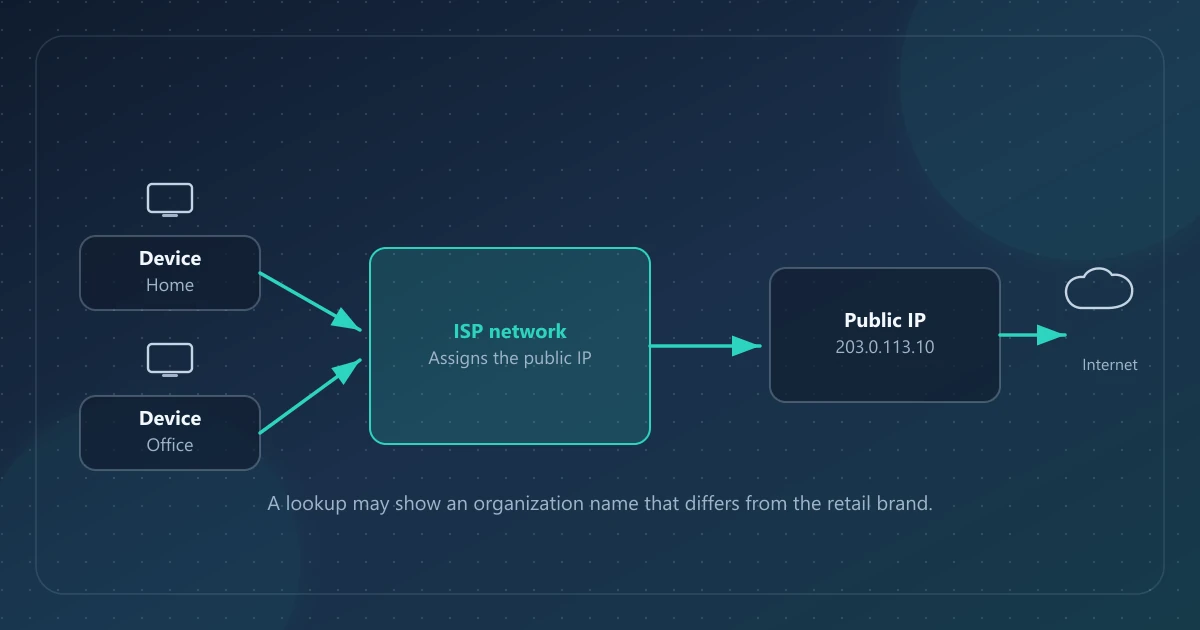
Ένας πάροχος υπηρεσιών διαδικτύου (ISP) είναι ο οργανισμός που σας δίνει πρόσβαση στο διαδίκτυο—τυπικά εκχωρώντας συνδεσιμότητα και μία ή περισσότερες διευθύνσεις IP στο δίκτυό του. Όταν μια αναζήτηση IP παραθέτει ISP ή οργανισμό, ονομάζει μια συσχέτιση δικτύου για εκείνη τη διεύθυνση, όχι το πρόσωπο που πλήρωσε τον λογαριασμό.
Το IPinfoLabs εμφανίζει ISP και Οργανισμό στον κύριο πίνακα για μια δημόσια IP. Αυτές οι ετικέτες προέρχονται από τον πάροχο δεδομένων αναζήτησης. Δεν εκθέτουν λογαριασμούς συνδρομητών και δεν υποκαθιστούν τον έλεγχο ποια δημόσια IP βλέπει πραγματικά ένας ιστότοπος.
Άμεση απάντηση
Ένας ISP λειτουργεί υποδομή δικτύου και παρέχει πρόσβαση στο διαδίκτυο σε πελάτες ή δίκτυα πελατών. Η δημόσια IP σας προέρχεται συνήθως από χώρο διευθύνσεων που ανακοινώνει εκείνος ο ISP (ή ένας ανάντη πάροχος). Ένα εργαλείο αναζήτησης μπορεί να αναφέρει ένα όνομα για εκείνον τον χώρο. Αυτό το όνομα μπορεί να είναι καταναλωτική μάρκα, μητρική εταιρεία, πάροχος κινητής, πάροχος φιλοξενίας ή έξοδος VPN—και δεν μπορεί να προσδιορίσει μέλος νοικοκυριού ή να ανοίξει τα ιδιωτικά αρχεία ISP κανενός.
Τι είναι ένας ISP
Στην καθημερινή γλώσσα, «ο ISP μου» είναι η εταιρεία στον λογαριασμό διαδικτύου σας: πάροχος καλωδίου, οπτικής ίνας, DSL, σταθερής ασύρματης ή κινητής.
Σε όρους διευθυνσιοδότησης, ένας ISP (ή ένα σχετικό Τοπικό μητρώο διαδικτύου) λαμβάνει χώρο διευθύνσεων IP μέσω του συστήματος Περιφερειακών μητρώων διαδικτύου (ICANN ASO: RIRs) και ανακοινώνει διαδρομές ώστε άλλα δίκτυα να μπορούν να φτάσουν εκείνες τις διευθύνσεις. Πολλές καταναλωτικές μάρκες ανήκουν σε μεγαλύτερους ομίλους· το όνομα σε μια βάση δεδομένων μπορεί να ακολουθεί εκείνη την εταιρική δομή αντί για το λογότυπο στο μόντεμ σας.
Τι κάνει ένας ISP (τα μέρη που επηρεάζουν μια αναζήτηση IP)
Σχετικές εργασίες, με απλά λόγια:
- Παρέχει σύνδεση τελευταίου μιλίου ή ασύρματη σύνδεση στο διαδίκτυο
- Εκχωρεί διευθύνσεις (μερικές φορές αλλάζοντάς τες) σε εκείνη τη σύνδεση
- Δρομολογεί κίνηση προς άλλα δίκτυα
- Συχνά λειτουργεί NAT ή CGNAT στο IPv4 ώστε πολλοί πελάτες να μοιράζονται δημόσιες διευθύνσεις
Ένας ISP μπορεί επίσης να τηρεί αρχεία εκχώρησης (ποιος πελάτης ή πύλη χρησιμοποίησε μια διεύθυνση σε μια στιγμή). Τα δημόσια εργαλεία αναζήτησης, συμπεριλαμβανομένου του IPinfoLabs, δεν έχουν αυτά τα αρχεία. Δείτε τι μπορεί και τι δεν μπορεί να αποκαλύψει μια διεύθυνση IP.
Πώς σχετίζεται ένας ISP με τη δημόσια IP σας
Οι ιστότοποι βλέπουν μια IP προέλευσης για το αίτημά σας. Εκείνη η διεύθυνση ανήκει συνήθως σε ένα μπλοκ που χρησιμοποιεί ο πάροχος πρόσβασής σας (ή ένας διαχειριστής VPN/φιλοξενίας μπροστά σας).
- Στο σπίτι, αυτή είναι συχνά η προς τον ISP διεύθυνση μετά το NAT του δρομολογητή σας
- Στο CGNAT, η διεύθυνση του ελεγκτή μπορεί να βρίσκεται πιο πάνω από την IP WAN στο περιβάλλον του δρομολογητή (RFC 6598)
- Σε VPN, το πεδίο ISP συνήθως περιγράφει το δίκτυο εξόδου, όχι τον ISP πρόσβασης στον δρόμο σας
Οι ιδιωτικές διευθύνσεις LAN όπως 192.168.1.24 εκχωρούνται τοπικά· δεν είναι η δημόσια ταυτότητα του ISP στο διαδίκτυο. Λεπτομέρειες: δημόσιες έναντι ιδιωτικών διευθύνσεων IP.
Τι δείχνουν τα εργαλεία αναζήτησης IP για ISP / οργανισμό
Στον πίνακα του IPinfoLabs:
| Πεδίο | Τι είναι συνήθως | Τι δεν είναι |
|---|---|---|
| ISP | Το όνομα παρόχου που σχετίζεται με τη διεύθυνση στα δεδομένα αναζήτησης | Απόδειξη του νομικού ονόματος του κατόχου λογαριασμού |
| Οργανισμός | Σχετική ετικέτα δικτύου ή εταιρείας από την ίδια κατηγορία δεδομένων | Κατάλογος υπαλλήλων ή μελών νοικοκυριού |
Η Μαζική αναζήτηση περιλαμβάνει στήλη ISP και στήλη ASN (έως 50 διευθύνσεις). Ένας ASN (αριθμός αυτόνομου συστήματος) προσδιορίζει έναν τομέα δρομολόγησης στο δημόσιο διαδίκτυο· ένας ISP μπορεί να λειτουργεί έναν ή περισσότερους ASN. Ο κύριος πίνακας δεν εμφανίζει ASN.
Το IPinfoLabs δεν εκτελεί αναζητήσεις WHOIS ούτε εμφανίζει εισιτήρια μητρώου. Τα ονόματα είναι ό,τι επιστρέφει ο πάροχος αναζήτησης για εκείνη τη διεύθυνση τη στιγμή του ερωτήματος.
Δυναμικές έναντι σχετικά σταθερών διευθύνσεων
Πολλές καταναλωτικές συνδέσεις χρησιμοποιούν δυναμικές δημόσιες διευθύνσεις IPv4: η τιμή μπορεί να αλλάξει μετά από επανασύνδεση, ανανέωση μίσθωσης ή συντήρηση παρόχου. Ορισμένα επιχειρηματικά προϊόντα χρησιμοποιούν πιο σταθερές εκχωρήσεις. Τα προθέματα IPv6 μπορούν επίσης να είναι σχετικά σταθερά ή να εναλλάσσονται, ανάλογα με τον διαχειριστή.
Μια αλλαγμένη IP στο IPinfoLabs αφού επανεκκινήσετε έναν δρομολογητή συνάδει με δυναμική εκχώρηση. Δεν είναι απόδειξη ότι κάποιος «έκλεψε» την παλιά διεύθυνση ως ταυτότητα.
Οικιακά, επιχειρηματικά και δίκτυα φιλοξενίας
Τα ίδια πεδία αναζήτησης χρησιμοποιούνται για πολύ διαφορετικά δίκτυα:
- Οικιακή πρόσβαση — η κοινόχρηστη δημόσια IPv4 μέσω NAT είναι συνηθισμένη· ο γεωεντοπισμός μπορεί να είναι μητροπολιτικός κόμβος
- Επιχειρηματική / αποκλειστική — μερικές φορές σταθερότερη διεύθυνση και όνομα οργανισμού εταιρικού ύφους
- Φιλοξενία, νέφος, VPN — ο «ISP» είναι συχνά κέντρο δεδομένων ή διαχειριστής VPN· τα πεδία τόπου ακολουθούν εκείνη την υποδομή
Το IPinfoLabs δεν ταξινομεί μια διεύθυνση ως «οικιακή» ή «επιχειρηματική» ως ξεχωριστό χαρακτηριστικό προϊόντος. Η εξαγωγή του τύπου δικτύου από όνομα ή πόλη είναι εικασία εκτός αν έχετε άλλα αποδεικτικά στοιχεία.
Γιατί το όνομα μπορεί να μην ταιριάζει με τη μάρκα στον λογαριασμό σας
Συνηθισμένες, νόμιμες αναντιστοιχίες:
- Χονδρική ή white-label πρόσβαση που πωλείται υπό λιανική μάρκα
- Μητρική εταιρεία ή όνομα συμμετοχών στη βάση δεδομένων
- Κινητή κίνηση που εξέρχεται μέσω κεντρικού δικτύου με διαφορετική ετικέτα
- Ένα VPN, διακομιστής μεσολάβησης ή δίκτυο εργοδότη που αντικαθιστά τον ISP πρόσβασης σε εκείνη τη διαδρομή
- Παρωχημένες ή γενικές ετικέτες μετά από συγχώνευση ή μεταβίβαση διευθύνσεων
Καμία από αυτές τις αναντιστοιχίες δεν χορηγεί πρόσβαση σε αρχεία χρέωσης. Αν αναζητήσετε μια διεύθυνση που δεν είναι δική σας, εξακολουθείτε να βλέπετε μόνο μεταδεδομένα δικτύου—όχι τον συνδρομητή.
VPN, διακομιστές μεσολάβησης και το πεδίο ISP
Όταν μια σήραγγα λειτουργεί για εκείνο το αίτημα προγράμματος περιήγησης, ο ISP και ο οργανισμός συνήθως περιγράφουν την έξοδο. Η κατά προσέγγιση τοποθεσία ακολουθεί την ίδια έξοδο (γεωεντοπισμός IP).
Αυτό που δεν αλλάζει αυτόματα:
- Ο ISP πρόσβασης που παραδίδει το τελευταίο μίλι (εξακολουθούν να βλέπουν ότι είστε πελάτης)
- Συνδέσεις ιστότοπων και cookies
- Τοπικά πεδία προγράμματος περιήγησης/συσκευής στο IPinfoLabs (αυτά παραμένουν της συνεδρίας σας)
Χρησιμοποιήστε έναν ελεγκτή για να επιβεβαιώσετε το ορατό ζεύγος ISP/IP μετά τη σύνδεση. Αυτός είναι έλεγχος διαδρομής, όχι ανωνυμία.
Συνηθισμένες παρανοήσεις
«Το πεδίο ISP είναι το όνομά μου.»
Όχι. Είναι ετικέτα δικτύου.
«Αν ξέρω τον ISP, μπορώ να δω τι περιηγήθηκαν.»
Μια δημόσια αναζήτηση δεν ανακτά αρχεία καταγραφής παρόχου, ιστορικό DNS ή αρχεία συνδρομητή.
«Η φιλοξενία στο όνομα ISP σημαίνει ότι ο χρήστης είναι εγκληματίας.»
Ο χώρος διευθύνσεων νέφους και VPN χρησιμοποιείται για συνήθη και καταχρηστική κίνηση εξίσου. Η ετικέτα δεν είναι ετυμηγορία.
«Το ASN στη μαζική αναζήτηση προσδιορίζει πρόσωπο.»
Ένας ASN προσδιορίζει σύστημα δρομολόγησης. Είναι χρήσιμο πλαίσιο δικτύου, όχι έγγραφο ταυτότητας.
Πρακτικό συμπέρασμα
- Διαβάστε τα ISP και Οργανισμός ως τα ονόματα του παρόχου δεδομένων για τη διεύθυνση.
- Συγκρίνετέ τα με τη δημόσια IP που πραγματικά θέλατε να ελέγξετε.
- Αναμένετε διαφορές μάρκας έναντι μητρικής εταιρείας.
- Σε VPN, αναμένετε τον διαχειριστή εξόδου—όχι τον οικιακό ISP σας—εκτός αν η σήραγγα δεν μεταφέρει εκείνη την κίνηση.
- Για IPv4 έναντι IPv6 στην ίδια σύνδεση, δείτε IPv4 έναντι IPv6.
Συχνές ερωτήσεις
Είναι ο ISP μου ο ίδιος με τον ιστότοπο που επισκέπτομαι;
Όχι. Ο ISP (ή η έξοδος VPN) παρέχει συνδεσιμότητα. Ο ιστότοπος είναι ξεχωριστός προορισμός που βλέπει την IP προέλευσής σας.
Μπορεί το IPinfoLabs να πει ποιος είναι ο συνδρομητής;
Όχι. Δεν υπάρχουν λογαριασμοί, κατάλογος συνδρομητών ούτε πρόσβαση σε αρχεία πελατών ISP. Δείτε την Πολιτική απορρήτου.
Γιατί η μαζική αναζήτηση δείχνει ASN αλλά ο πίνακας όχι;
Η Μαζική αναζήτηση περιλαμβάνει ASN και εκτιμώμενες συντεταγμένες ως επιπλέον στήλες δικτύου. Ο κύριος πίνακας εστιάζει στην IP, τον ISP, τον οργανισμό και την κατά προσέγγιση χώρα/περιοχή/πόλη, συν τοπικό πλαίσιο προγράμματος περιήγησης/συσκευής.
Σημαίνει ένα μεταβαλλόμενο όνομα ISP ότι άλλαξα παρόχους;
Όχι πάντα. Μπορεί να σημαίνει ότι συνδέθηκε VPN, ανανέωση βάσης δεδομένων, ετικέτα μητρικής εταιρείας ή διαφορετική διαδρομή πρωτοκόλλου. Ελέγξτε αν άλλαξε και η IP.