

Public vs Private IP Addresses: What’s the Difference?
Public vs Private IP Addresses: What’s the Difference?
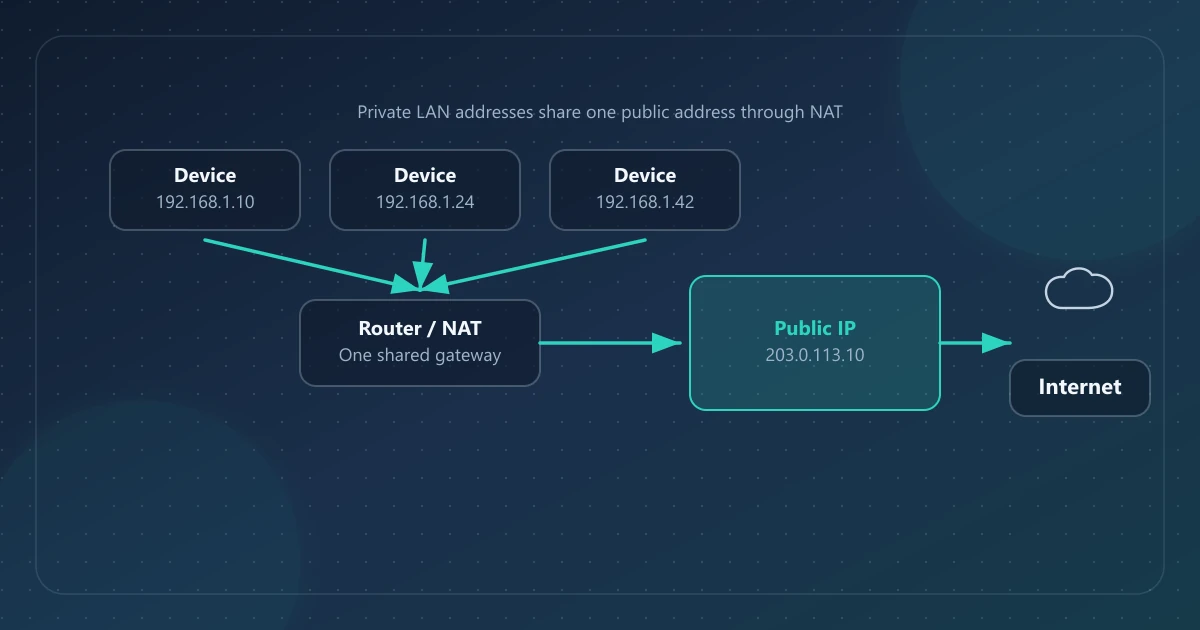
Public IP addresses come from address space used for routing between networks on the public internet. Private IPv4 addresses come from ranges reserved for local networks and are not globally reachable. Many homes and offices give private addresses to local devices, then use a gateway to communicate through one or more public addresses.
That split is why “what is my IP?” websites show a different number than the IPv4 address in your Wi‑Fi details.
Direct answer
| Public IP | Private IP | |
|---|---|---|
| Scope | Used as an internet-facing source or destination, subject to routing and firewall policy | Meaningful within one administrative network |
| Who assigns it | An ISP, hosting provider, VPN provider, or network operator from allocated space | A local administrator, router, or DHCP service |
| Visible to websites? | Yes—this is typically what they see | No—not as your internet-facing identity |
| Examples | 203.0.113.10 illustrates the IPv4 format but is TEST-NET-3 documentation space, not an active public endpoint | 192.168.1.24, 10.0.0.5, 172.16.0.8 |
Why both exist
RFC 1918 reserves IPv4 blocks for private internets so organizations can number internal hosts without coordinating those addresses globally. Reuse of that space, commonly combined with address-and-port translation at the edge, also reduces demand for public IPv4 addresses.
Private addresses can be reused on countless separate networks at once because they are not meant to be globally reachable.
The RFC 1918 private IPv4 ranges
These three blocks are the classic private-use ranges:
| CIDR | Address range | Common use |
|---|---|---|
10.0.0.0/8 | 10.0.0.0 – 10.255.255.255 | Larger LANs, some ISP/customer equipment |
172.16.0.0/12 | 172.16.0.0 – 172.31.255.255 | Enterprise and lab networks |
192.168.0.0/16 | 192.168.0.0 – 192.168.255.255 | Typical home routers |
IANA’s IPv4 Special-Purpose Address Registry marks these blocks as not globally reachable. They can be forwarded inside an administrative network, but they are not valid public internet destinations.
Related ranges people confuse with “private”
These are not the RFC 1918 trio, but they also are not ordinary public host addresses:
127.0.0.0/8— loopback (your own machine)169.254.0.0/16— link-local (often appears when DHCP fails)100.64.0.0/10— shared address space for carrier-grade NAT (RFC 6598)
If your router’s WAN IP sits in 100.64.0.0/10, you may be behind CGNAT: the router does not hold a globally reachable public IPv4 address, even though devices can still reach the internet through the provider’s translation system.
How NAT connects private devices to the public internet
The common home-router form of Network Address Translation, more precisely Network Address and Port Translation (NAPT/PAT), lets several private hosts share one public IPv4 address.
Simplified flow:
- Your laptop at
192.168.1.42requests a website. - The gateway rewrites the private source address and usually the source port to a public mapping.
- The website replies to the public IP.
- The gateway uses its translation state to forward the reply to
192.168.1.42.
The remote website typically never needs your private address. That is why checking your public IP is the right way to answer “what does the internet see?”
NAT is a connectivity design. It is not a complete security product by itself, and it does not hide your public IP from sites you visit.
IPv6 note (short and accurate)
IPv6 has a vastly larger address space. A network may assign global unicast IPv6 addresses alongside private IPv4 addresses used through NAT. Global addressing does not mean unsolicited inbound traffic is allowed; firewall policy still applies. IPv6 Unique Local Addresses use the fc00::/7 block; the locally assigned format defined by RFC 4193 sets the local bit, producing prefixes under fd00::/8. ULAs are not expected to be routed on the global internet.
If a “what is my IP” tool returns a global IPv6 address, that is the source address that reached the checker over IPv6—not a 192.168.x.x IPv4 LAN address. For formats, dual-stack, and how to tell which protocol you are using, read IPv4 vs IPv6.
How to tell which kind of address you are looking at
On your device (often private)
Windows, macOS, iOS, and Android network settings usually show a LAN address such as 192.168.x.x or 10.x.x.x. That is normal for Wi‑Fi.
On a public checker (public)
Open IPinfoLabs (or another checker). The address shown there is what a remote service sees for that connection path.
On your router
- LAN / DHCP clients → private addresses
- WAN / Internet status → often the public IPv4 address—or a CGNAT address if your ISP uses shared space
Why this matters for IP lookup tools
Public IP lookup tools—including IPinfoLabs—are intended for globally assigned addresses. Private, local, reserved, or otherwise unsupported inputs may be rejected by the site or its upstream provider. Such ranges are not meaningful targets for ordinary public geolocation.
When you look up a public IP you get network context for that address (ISP, approximate location). You do not get another user’s private LAN map. For limits on what public IPs imply about people, read What an IP Address Can and Cannot Reveal. For the ISP and organization labels on a lookup, see What Is an ISP?.
Common mix-ups
“My IP is 192.168.1.10, but the website shows something else.”
Both can be correct. One is local; one is public.
“We have two public IPs at home.”
Possible with business service, multiple WANs, or IPv4+IPv6 dual-stack. Compare protocol and interface before assuming a leak.
“VPN connected, but my private IP didn’t change.”
That can be normal. A VPN changes the source address seen by sites for traffic sent through the tunnel. Your LAN address may remain unchanged, although a VPN client can also create a virtual interface with its own internal address.
“Can I look up my printer’s 192.168.x.x address on the internet?”
No meaningful public geolocation exists for that private address. Manage printers on the local network.
Practical checklist
- Identify whether the address starts in an RFC 1918 range (or loopback/link-local/CGNAT).
- Use a public checker for the internet-facing address.
- If VPN verification is the goal, compare public IP before and after connect.
- Keep private LAN diagrams off public tickets unless required.
- Remember: public ≠ precise personal location.
FAQ
Is a private IP more secure than a public IP?
Private addresses are not globally routed, and typical home gateways also use stateful firewall rules that block unsolicited inbound connections. Do not treat private addressing or NAT as a complete security control: router policy, exposed services, updates, and credentials still matter.
Can two homes use the same private IP?
Yes. Separate networks can both use 192.168.1.1 internally. That reuse is the purpose of private address space.
Does IPv6 eliminate private addresses?
Not entirely. IPv6 reduces pressure to NAT every host, but unique local addresses and mixed IPv4/IPv6 networks remain common.
Which address should I give to a support engineer?
Ask what they need. For “what does our server see?” provide the public IP from a checker. For “can’t reach the NAS on Wi‑Fi?” they may need the private LAN address and your local topology.
References
- RFC 1918 — Address Allocation for Private Internets
- RFC 6598 — Shared Address Space
- RFC 4193 — Unique Local IPv6 Unicast Addresses
- RFC 5737 — IPv4 Address Blocks Reserved for Documentation
- IANA IPv4 Special-Purpose Address Registry
- IPinfoLabs glossary — short definitions for public IP, private IP, ISP, and related terms